- Effects
- 102, in three collections
- Output
- 1080 × 1920 MP4 (4K optional), original audio kept
- Runs
- locally in Claude Code on macOS
- Price
- free for personal use
- Version
- 1.3.0a2, updated 9 November 2026
What is Rananjay FX?
Rananjay FX is a free Claude Skill that adds 102 named video effects to vertical (9:16) talking-head footage. You give Claude Code a video, an effect name and a time window, and the Skill's local Python engine renders the effect onto your clip. The engine finds your face and your outline on every frame. That lets an effect sit behind you, wrap around you, or float beside your head without ever covering your face. The bottom 22% of the frame stays clear so you can add captions later. The effects cover titles and captions, camera moves, colour grades, glass interface widgets, news and editorial layouts, product-UI scenes, and full-screen transitions. Rananjay Raj built it for his own Instagram reels (@rananjay.ai) and tested every effect on his own footage. Output is a 1080 × 1920 H.264 MP4 at your clip's frame rate, with the original audio copied in.
I use these on every reel I edit
Most of my reels are me at a desk, talking to the camera. A plain talking head loses people fast, so I add one visual change every few seconds: a list that ticks off as I name things, a glass playlist that scrolls beside me, a Swiss-style poster that my shot shrinks into.
I used to build each one by hand in an editor. Now I describe the moment to Claude and it renders the effect onto my clip. This Skill is that toolkit, all 102 effects, with the instructions Claude needs to place them well.
Here is what is inside, how to install it, and the prompt to start.
What's inside: three collections
| Collection | Effects | What it covers |
|---|---|---|
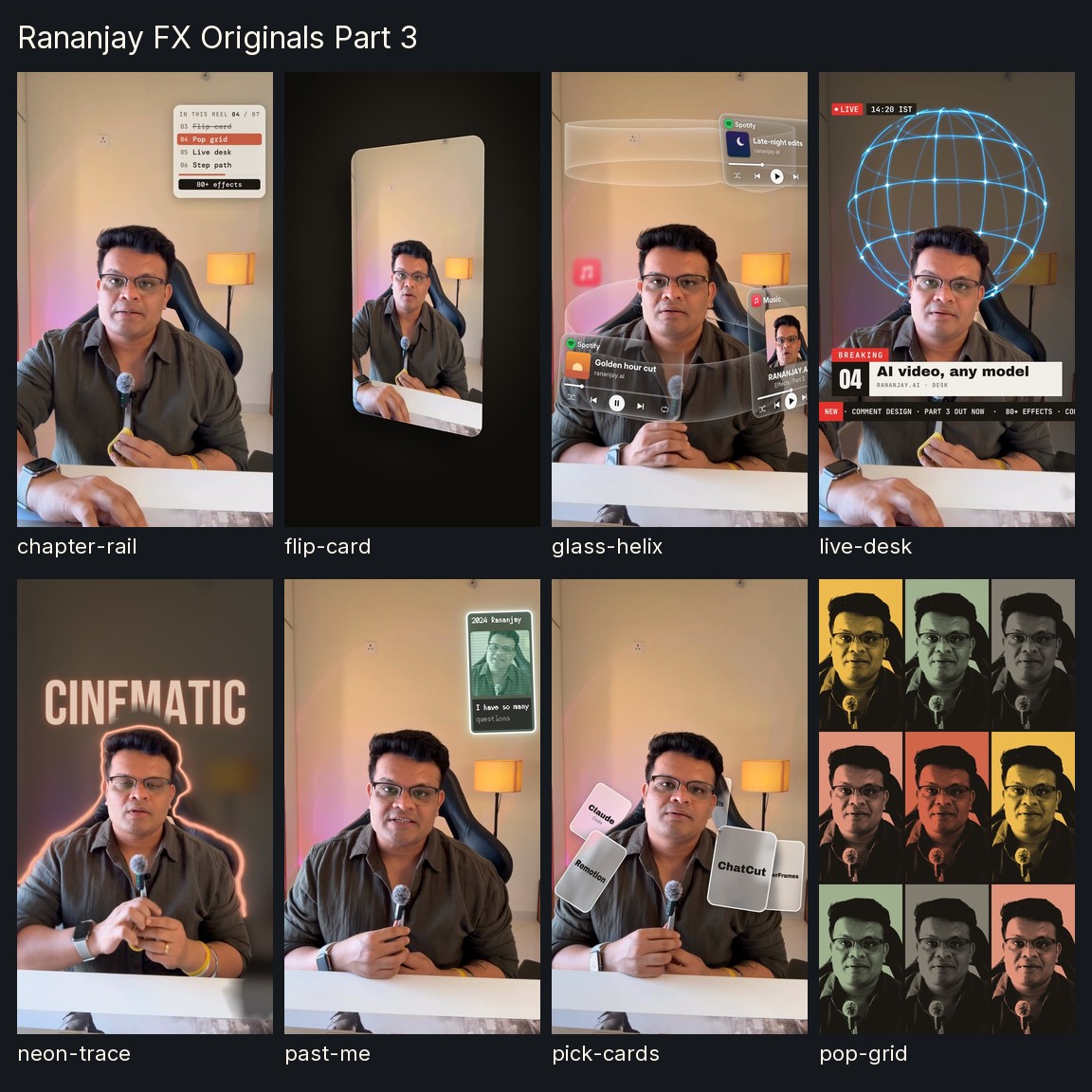
| Rananjay FX Originals Part 3 | 17 | The newest set: liquid-glass widgets, an iPhone Control Centre on your wall, a news desk, a Swiss poster frame, 3D flips and grids |
| Rananjay FX Originals Part 2 | 31 | Titles, captions, chat and message overlays, transitions, film looks and product-UI scenes |
| Rananjay FX Originals Part 1 | 54 | Camera moves, colour grades, room graphics, editorial layouts, media walls, timelines and tracked labels |
A 103rd command, ui-clip, places your own transparent video on top of your shot.
The 17 new effects in Part 3
| Effect | What happens on screen |
|---|---|
chapter-rail | An "In this reel" list on the side. The current row lights up and finished rows strike through as you name each item. |
flip-card | Your shot shrinks to a glossy card, flips in 3D and lands with a cinematic grade on. |
pop-grid | The frame splits into 4, then 9 live two-tone tiles of you. The centre tile becomes a title card. |
live-desk | A news desk: LIVE bug, a blue wireframe globe behind you, a red BREAKING tag, a lower third and a ticker. |
step-path | A glowing path above your head links numbered steps. A light travels to each one on cue. |
neon-trace | The room darkens and a neon tube draws around your outline, with a big word glowing behind you. |
glass-helix | Wide liquid-glass ribbons spiral around you, carrying glass music-player cards. |
wrist-holo | Tap a smartwatch and a light cone opens with a time, weather and heart-rate display and three photo cards. |
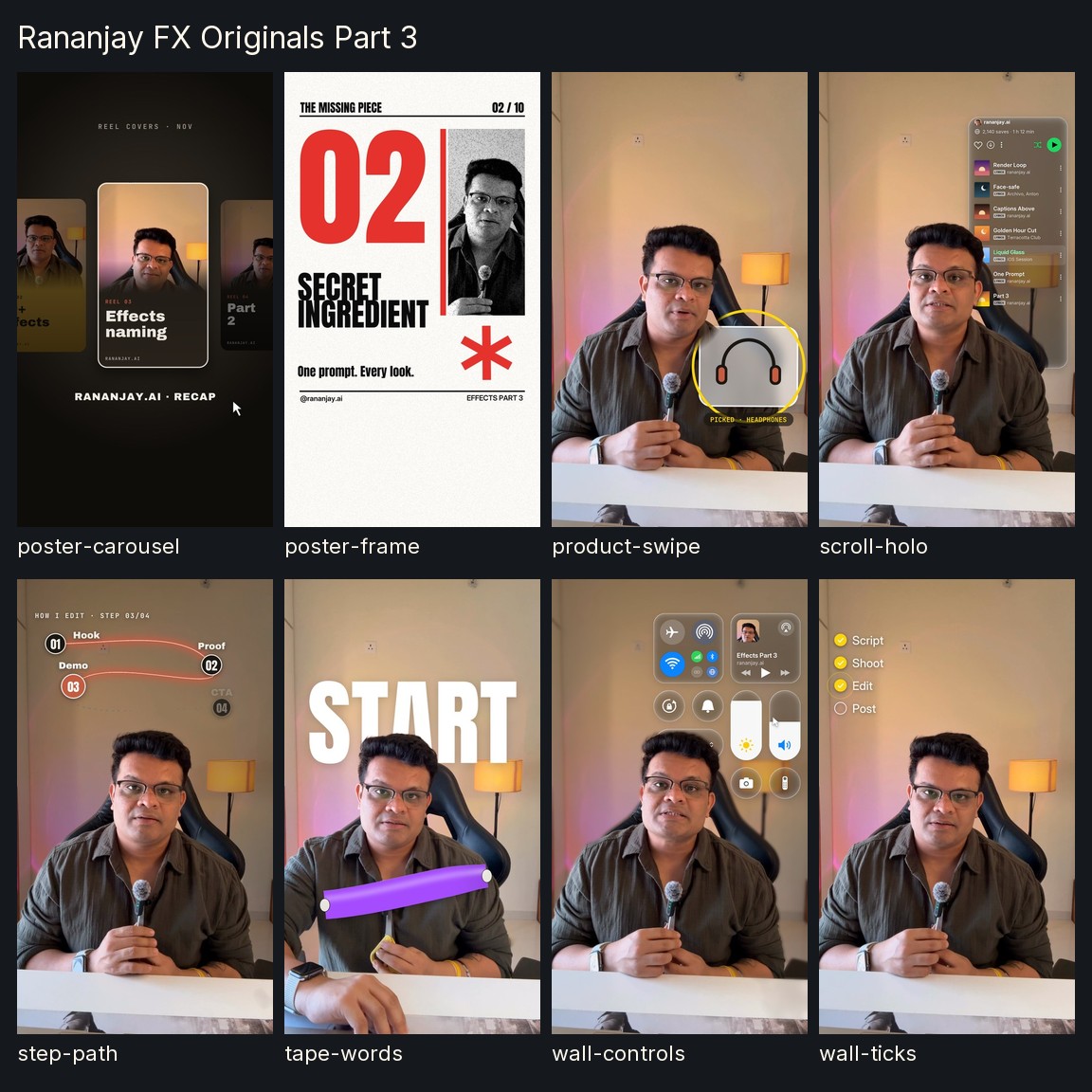
product-swipe | Each hand swipe swaps the product floating in front of you. A yellow ring marks the one you pick. |
tape-words | A wide glossy band stretches between your fingertips. Each stretch swaps a huge word behind you. |
past-me | A mint hologram card beside your head plays another moment of you, with its own subtitles. |
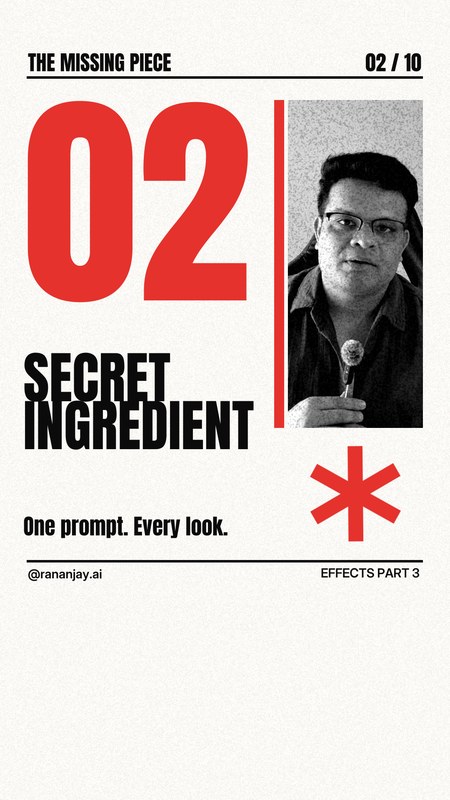
poster-frame | Your shot becomes a grainy black-and-white column on a Swiss-style poster with a huge red number. |
pick-cards | Glass tool cards tumble around you. You grab one and throw it at the lens, and it fills the screen. |
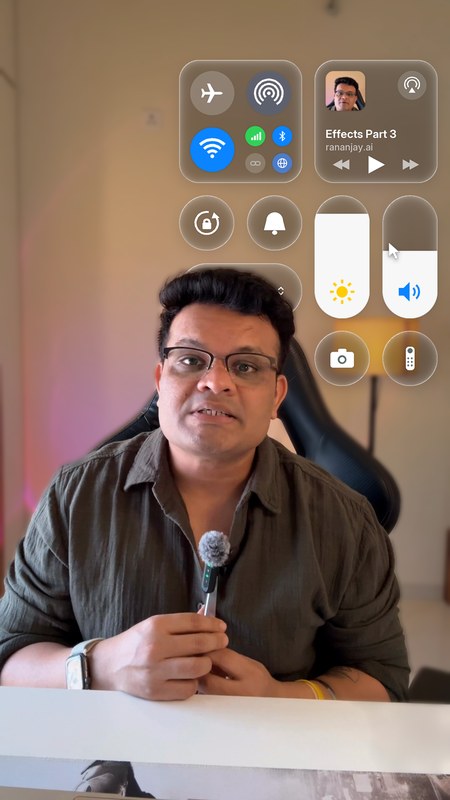
wall-controls | An iPhone-style Control Centre appears on the wall behind you. Dragging brightness changes your room. |
poster-carousel | Full-screen recap: your reel covers slide past, and the centre one opens into the clip. |
scroll-holo | A tall liquid-glass panel beside you scrolls a playlist and stops on one track. |
wall-ticks | A checklist on the wall behind you. Each circle fills yellow with a tick on cue. |
Parts 1 and 2 at a glance
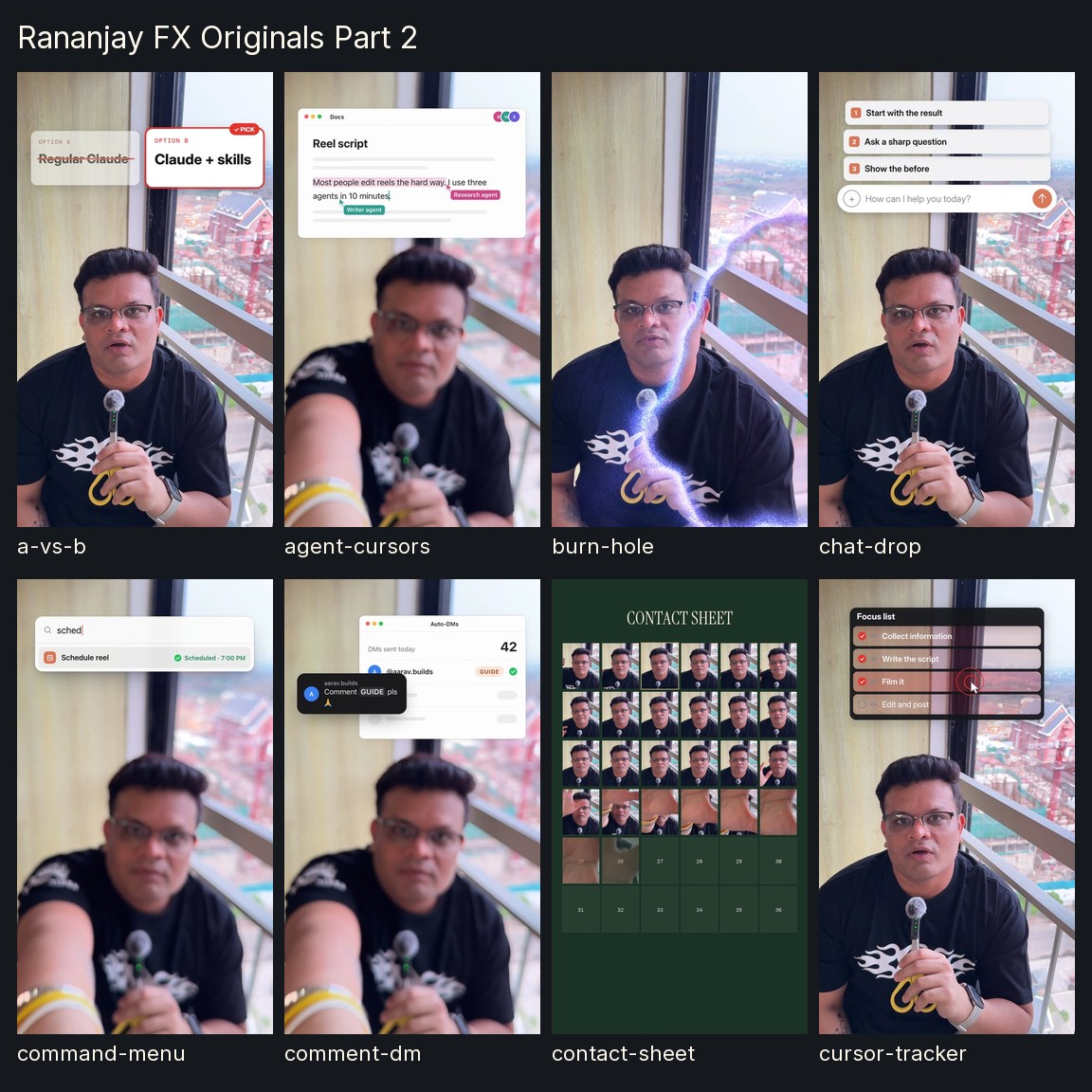
- Titles and captions: giant captions, script-over brush titles, split headlines, boxed titles, wall text, LED signs, dot-matrix words.
- Camera moves: punch-in, slow push, face lock, vertigo, zoom-through cut, digital zoom, rabbit-hole tunnel.
- Colour and looks: cinematic and moody grades, film strip, eyedropper grade, spotlight, green-screen background swap.
- Interface overlays: iMessage banners, AI chat box, command menu, Dynamic Island, lock-screen notifications, iPhone toggles, glass widgets, comment boxes.
- Editorial layouts: magazine cover, headline wall, paper cut, screenplay page, tier list, timeline, contact sheet.
- Transitions: iris, burn hole, dot reveal, strip stack, flicker cards.
The complete list of effect names and options is in docs/effects.md inside the download. Each collection also has a storyboard with a real frame of every effect.
How does it keep effects off your face?
Every frame goes through two small models that ship with the Skill: a face detector (YuNet) and a person cut-out model (MediaPipe Selfie Segmenter). Overlays placed in front of you fade out wherever they would touch your face. Effects marked "behind" are tucked behind your body, so you appear to stand in front of them. Panels measure the space above your head and shrink rather than overlap it. Zooms are capped at 2×, and the bottom 22% of the frame stays free for captions, except during full-screen moments such as transitions.
Preview stills are still part of the workflow. Detection can miss a fast head turn, so Claude checks frames before every render.
Step 1: Film for the effects
Most effects work on any 9:16 clip with one person in view. These habits give them room:
- Frame from the chest up, with space above your head. Lists, paths and panels sit there.
- Sit or stand a little in front of a plain wall. Wall effects such as
wall-controlsandwall-ticksare drawn on it, behind you. - Keep the bottom of the frame for captions. The effects already avoid it.
- Film the gestures for the hand effects.
tape-words: stretch your hands apart 4–5 times at chest height.wall-ticks: stand side-on to the wall and touch 4 spots in a column.pick-cardsandproduct-swipe: reach and swipe in front of you. The Skill does not track hands, so Claude reads the times and positions from your take and enters them for you.
Step 2: Install the Skill
You need Claude Code running locally with a supported Claude account or API billing, plus these free tools:
- macOS (the tested platform)
- FFmpeg
- Python 3.12 (3.11 is the minimum)
Keep about 500 MB of disk space free. Setup needs internet once, to install the Python packages. After that, renders run fully on your Mac. The Skill is free; Claude usage may carry a subscription or API cost. See the Claude Code access guide for account options.
Then install it:
- Download the archive with the button at the top of this page.
- Unzip
rananjay-fx.zip. You get a folder calledrananjay-fx. - Move it to
~/.claude/skills/. The final path should be~/.claude/skills/rananjay-fx/SKILL.md. - Open Claude Code and ask: "Set up my rananjay-fx skill: read SKILL.md and run the setup script."
If you prefer Terminal:
brew install ffmpeg python@3.12
cd ~/.claude/skills/rananjay-fx
bash scripts/install.sh
bash scripts/rfx.sh doctor
install.sh prints READY when setup is done. These steps follow the Claude Code personal Skills layout.
Step 3: Ask Claude to add an effect
Open Claude Code in the folder with your video and name the effect, the moment and any text:
Use the rananjay-fx skill on my video. When I say "three steps", add step-path with the steps Hook, Proof, Demo, CTA. When I say "breaking news", add live-desk with the headline "AI video, any model". Check stills of each effect before rendering.Shorter requests work too:
/rananjay-fx poster-frame from 12 to 15 seconds, number 02, headline Secret|ingredient
/rananjay-fx glass-helix from 3 to 8 seconds
Claude measures where your head sits, renders preview stills at the middle of each effect, checks them, adjusts placement, then renders the full video. To time an effect to a phrase, Claude needs a transcript with word timings. Transcription is not part of this Skill, so ask Claude to make one first.
Step 4: Give it notes
Watch the first render at full speed and tell Claude what feels off:
- "The rail is too small to read on a phone. Make it bigger."
- "Start the globe half a second earlier, on the word 'live'."
- "Use yellow for the ticks, not the brand colour."
- "Keep the panel lower. It's touching my hair."
Every effect has options for its text, colours, timing and position, so most notes are a quick re-render. Always watch the final video before you post it.
What it does not do
- It does not add music, sound effects or automatic subtitles. The effects are visual only.
- It does not track hands. Hand-driven effects use times and positions read from your take.
- Some interface scenes in Part 2 are pre-recorded, so their on-screen wording is fixed.
ui-cliptakes your own recording instead. - Windows and Linux are not tested.
If you make a reel with these, I'd love to see which effect you use first. Tag me @rananjay.ai.
Rananjay
Frequently asked questions
Is Rananjay FX free?
Yes. The Skill is free for personal use, and you can post and monetise the videos you make with it. You can't sell or re-upload the Skill itself. Claude Code usage may carry a subscription or API cost.
What do I need to run it?
Claude Code running locally on macOS, FFmpeg, Python 3.12 (3.11 minimum), internet access for the first setup, about 500 MB of free disk space, and your own vertical video.
How many effects are included?
102 named effects in three collections: 54 in Rananjay FX Originals Part 1, 31 in Part 2 and 17 in Part 3, plus a loader for your own transparent clips.
Will the effects cover my face?
No. A face detector and a person cut-out model run on every frame. Overlays fade out over the face, and "behind" effects sit behind your body. Check the preview stills, because detection can miss very fast movement.
Does it work on any video?
It works best on vertical 9:16 clips with one person in view. Wider or multi-person shots render, but layouts may need adjusting.
Does it change my audio?
No. The original audio is copied into the output. Only AAC audio is copied as is; other formats are converted to AAC at 192 kbps.
Related Skills
By Rananjay Raj, published by BuildWire AI. Reviewed on 9 November 2026.