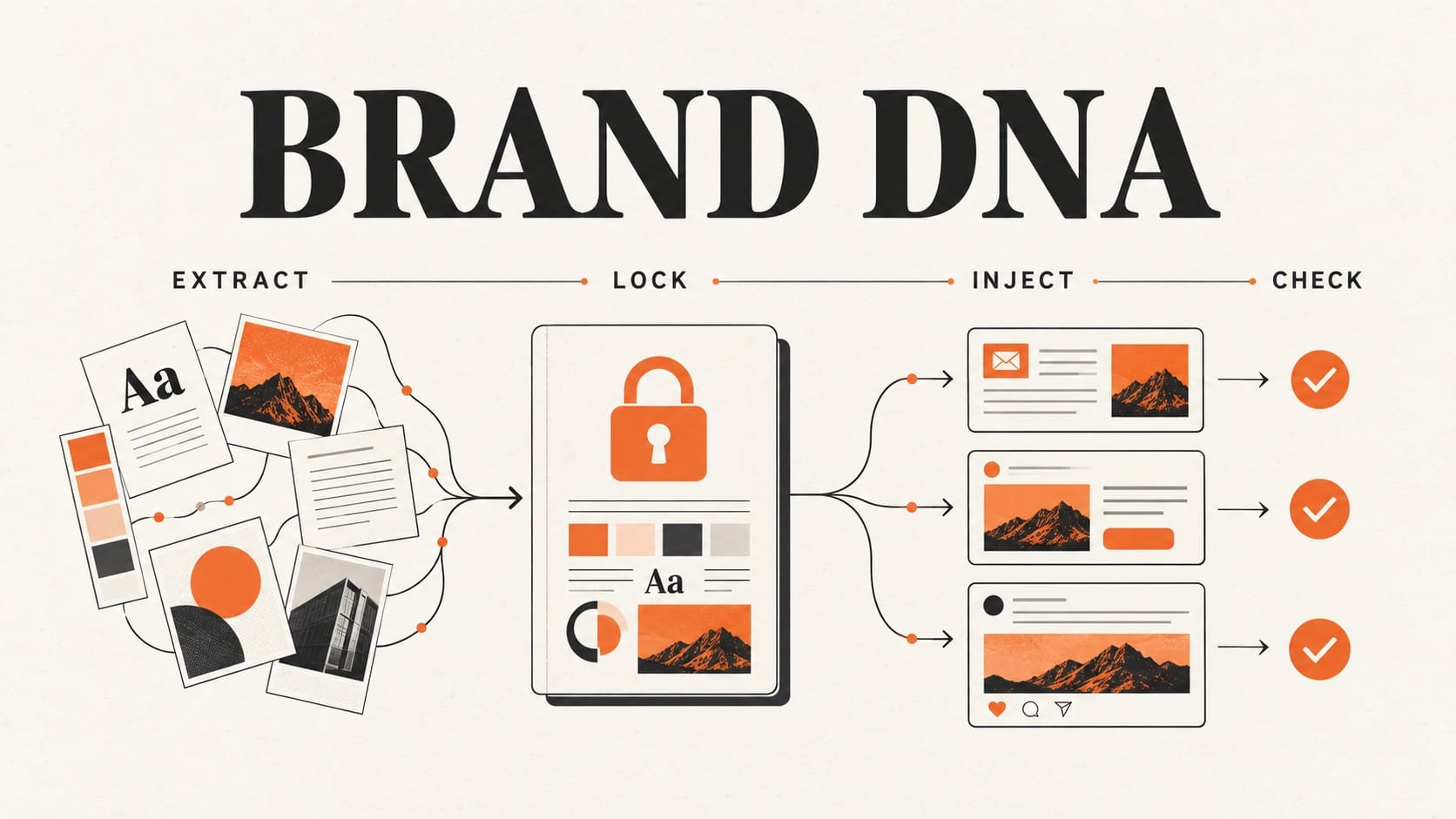
Most teams give their AI agents a brand PDF and a one-line tone note. Within a month, the emails, ads and posts drift away from the brand. Each sentence can read well. The failure is control: nothing tells the agent which claims, words and boundaries are approved.
Brand DNA is a structured, versioned file that records your audience, voice, proof, boundaries and approved claims in a form AI agents can load. The system has four steps. First, extract the DNA from your best existing content. Next, a person locks what is true. Then inject the locked file into every drafting Skill and agent, and check each draft against it before it ships. Three free BuildWire Claude Skills cover extraction, voice examples and the pre-send check. A person owns the lock.
Why do brand docs fail when AI agents write?
One writer can carry a brand guide in their head, but ten agents drafting in parallel only know what they are given. Every new chat starts with no brand context unless someone loads it on purpose. A prompt line such as "be on brand" gives the model nothing specific to follow.
WotAI describes the same failure at team scale. When ten people read "professional yet approachable" in ten different ways, the guideline produces vague consistency. Adding AI makes the output blander still (What is Brand DNA?, WotAI, July 2026).
Brand tooling now treats the brand as something software calls. Several of these tools use MCP. MCP (Model Context Protocol) is the open standard that lets AI assistants connect to outside tools and data (MCP documentation).
- WotAI stores Brand, Audience and Competitor DNA behind one MCP-based API that content pipelines and agents call.
- brandsystem-mcp is an open-source server. It compiles a website, PDF guide or Figma library into a portable
.brand/folder that holds voice rules, anti-patterns and proof-point status. Agents load that folder when they generate. - brandkit-mcp exposes verbal and visual identity to Claude through 18 core tools. One of them,
validate_usage, checks copy for brand compliance. - Marketing Mary's workflow automation guide (updated September 2026) places a brand-voice check between the AI draft and the send or publish step.
We run the same loop with three Claude Skills and one human step:
| Step | Who or what runs it | Output |
|---|---|---|
| Extract | Brand DNA Extractor | A structured draft profile from your sources |
| Shape the voice | Brand Voice Guidelines Creator | Voice attributes, each with approved and rejected example lines |
| Lock | A named person on your team | An approved file with a version number and date |
| Inject | The owner of your agent setup | The locked file loaded into Skills, agent instructions and project context |
| Enforce | Brand Voice Enforcer | Tone and consistency flags for a person to review before anything ships |
What does a Brand DNA file capture?
A Brand DNA file has five sections. Each section answers a question that an agent would otherwise guess at.
| Section | What it records | Example entry |
|---|---|---|
| Audience | Who each channel speaks to, and who it deprioritizes | Email goes to heads of growth at seed to Series A software companies. Students are out of scope. |
| Voice | Tone attributes, each with one approved line and one rejected line | Approved: "The report runs every Monday at 9." Rejected: "Supercharge your reporting!" |
| Proof | Evidence agents may cite, with its source and date, plus known gaps | Approved: the published pricing page. Gap: no customer case study yet. |
| Boundaries | Off-limits words, competitor rules, regulated topics and humor limits | Never name a competitor in ad copy. Make no health claims. |
| Claims | The claims agents may make, and the claims they must never make | May say: "free to download." Must never say: "guaranteed results." |
Add visual cues, such as logo rules and banned imagery, when creative agents produce images or layouts. The Brand DNA Extractor Skill page lists the same scope: voice, audience, proof, visual cues and boundaries.
The Boundaries and Claims sections carry the most risk. Without them, an agent under deadline fills gaps with soft superlatives. A soft superlative in a blog draft can become a hard promise in an outbound email.
How do you extract Brand DNA from existing content?
Start from material that already sounds like your brand at its best:
- Your homepage and two or three product or about pages
- Three to five posts or emails you would still send today
- Excerpts from a sales one-pager or deck, with confidential numbers removed
- Any existing voice document, treated as one input among several
Run the Brand DNA Extractor on those sources. Ask for the five sections above as structured fields. A paragraph about "brand personality" gives an agent nothing to check a draft against. Next, run the Brand Voice Guidelines Creator so that every voice attribute has one approved line and one rejected line.
Treat the output as a draft. The Extractor's own page says it returns assumptions and gaps for review. It does not confirm facts, legal requirements or live performance unless you supply that evidence. The same rule applies to any extraction API or MCP server you adopt later.
What must a person lock before agents use Brand DNA?
An unreviewed extraction states guesses with the same confidence as facts. One person should approve, edit or reject each of these items in a single sitting:
- Every claim agents may repeat, including soft superlatives
- Competitor mentions and comparison rules
- Proof lines: which are dated, which need a source and which are banned
- Preferred terms and banned words, including stock AI phrasing
- Channel overlays, for example shorter sentences on LinkedIn or stricter claims in ads
- A version number and date at the top of the file
After the lock, the file is the source of truth until someone revises it. Chat history and saved memories do not override it.
We apply the same rule to write access on live marketing accounts: a person approves anything that is hard to reverse (how we gate Claude's write access to marketing accounts). The Brand DNA lock applies that rule to the context agents write from.
Where should locked Brand DNA live?
Put the locked file in every place where your agents load instructions:
- A project context file, such as
brand-dna.md, referenced from your agent instructions. - Each drafting Skill. Paste or attach the locked sections to the Skills that write email, social, ad and blog copy.
- Agent or project instructions. Add one short line: "Load Brand DNA v3. Make no claim outside the Claims and Proof sections."
- A shared Skills pack, so that voice and creative Skills read from the same file. The Creative & Brand Skills Pack bundles 18 free Skills for this work.
A file that lives in one person's Claude Project reaches one person. Every other agent and teammate still writes without it. Injection is complete when every place that drafts customer-facing copy loads the same version.
Refresh the file every month, and sooner after any change to positioning or offer. Agents that load a stale file keep selling last quarter's offer. The refresh can run as a scheduled n8n workflow, a Claude Skill or a calendar reminder. Pick one with the same test you use for other recurring marketing jobs (n8n vs Claude Code vs Claude Skills for marketing ops).
How does Brand Voice Enforcer check drafts before they ship?
Injection reduces drift. A pre-send check catches the drift that remains. Before a draft goes out, run Brand Voice Enforcer against the locked file. It reviews copy against a defined voice and flags tone or consistency gaps.
Handle each result as a gate:
- Pass: a person spot-checks the draft, then sends or publishes it.
- Flag: fix the draft or escalate it. A flagged draft does not ship unchanged.
- Publishing stays manual: the Enforcer produces a result for review and never posts on its own. Its Skill page states that any live change still needs separate approval.
Place the check where one bad draft reaches many people: outbound sequences, ad copy, homepage headlines and other customer-facing copy sent at volume. Internal brainstorm drafts can skip it.
How do we run this loop on our own content?
BuildWire is an AI studio that builds agents and automations for marketing and growth teams (about BuildWire). We use the same shape for everything we publish. Our writing rules include a maintained list of banned words, banned sentence patterns and the proof we may cite. That proof is limited to systems we built and run ourselves. A scanning script reads each finished draft, including headers and metadata, and fails it when it finds a banned word or an em dash. The draft goes back for edits until the script passes, and a person reads it before it goes live. This post went through that check.
We load the approved brand context early in an agent build so later drafting steps can refer to it. You can see what a BuildWire agent build includes.
When should you not use this loop?
Brand DNA controls how agents write. Other jobs need their own systems:
- Ranking in AI answers. Tracking whether ChatGPT or Perplexity cites your brand is a separate loop. See how to pick an AI visibility tracker by job.
- Legal and compliance sign-off. Regulated claims still need your legal reviewer.
- Publishing volume. A voice check ignores keyword overlap. Faster publishing without a keyword map causes keyword cannibalization.
- Replacing a brand owner. Extraction without a human lock repeats the same mistakes at automation speed.
How do you start this week?
- Collect 5 to 10 source URLs or files that already sound like your brand.
- Run Brand DNA Extractor to get a structured draft.
- Run Brand Voice Guidelines Creator to get approved and rejected example pairs.
- Lock the file in one sitting: claims, proof, boundaries and banned words. Add a version number and date.
- Inject the file into one drafting Skill and one agent's instructions. Start narrow.
- Make Brand Voice Enforcer a required step before your next customer-facing send.
- Put a 30-minute DNA refresh on the calendar after your next positioning or offer change.
The Creative & Brand Skills Pack, linked above, puts all three Skills in one free download. Each Skill also has its own page.
What are the limits of this approach?
- We make no claim about a percentage lift in open rate, conversion or any "on-brand score" from this loop. Run it because brand drift costs money, and measure the result on your own channels.
- Extraction quality follows source quality. A weak homepage produces a polished profile of a weak homepage.
- The Skills do not verify facts, legal requirements or live ad account data. Your team does.
- Third-party brand MCP tools change quickly. Check a repository's recent activity before you standardize on it.
Want the brand and agent workflows we run every week, written up like this one? Subscribe to The AI Driven Marketer newsletter, and follow along as we turn slow marketing jobs into short ones.
Frequently asked questions
What is Brand DNA in AI marketing?
Brand DNA is a structured, versioned file that describes a brand's audience, voice, proof, boundaries and approved claims. It is written so that AI agents can load it and follow it. It gives the agent specific rules and example lines in place of a vague tone note in a prompt.
How is Brand DNA different from a brand style guide?
A style guide is written for people to read. A Brand DNA file holds the same knowledge in fields that an agent loads on every task: audience, voice with example pairs, proof, boundaries and claims. It also carries a version number and a date, so agents and reviewers know which version applies.
Can AI extract Brand DNA automatically?
Yes, as a first draft. The Brand DNA Extractor Skill, WotAI and brandsystem-mcp can read a website, documents or past content and propose a profile. A person still approves the claims, proof and boundaries before agents use the file, because an extraction tool cannot tell which claims are true.
How often should you update Brand DNA?
Monthly suits most teams. Update it sooner after a positioning change, a new offer, a rebrand or a new regulated claim. Change the version number and date each time, so agents stop loading the old file.
Last reviewed 30 September 2026. The cited tool documentation and BuildWire Skill records were checked on 30 September 2026. Extraction and voice checks produce proposals for human review.
