Google now reports when its AI answers show your pages.
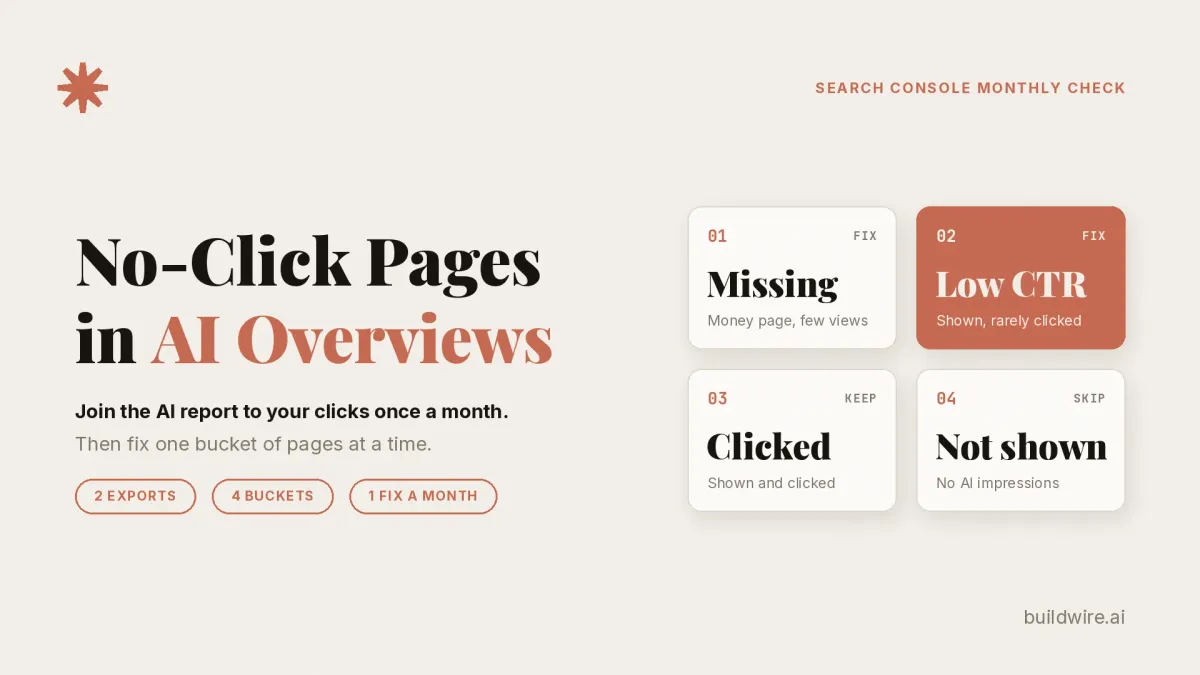
Search Console's Generative AI performance report shows which pages Google's AI Overviews and AI Mode display, counted as impressions only. Clicks sit inside the normal Web totals. Once a month, join both Pages exports by URL, sort pages into four buckets, and fix one bucket. Log each change.
The Generative AI performance report is a Search Console view that counts how often your pages appear in AI Overviews and AI Mode. According to Google's help page, the report reached all websites worldwide as of August 31, 2026.
An AI impression is one appearance of a link to your site inside a Google AI feature. Google defines impressions as "how many times links to your site were shown to a user in a generative AI feature on Google Search" (help page). An impression records an appearance only. It does not record a visit.
The Performance report (Web) is the standard Search Console report where Google counts clicks from AI Overviews and AI Mode. Google's clicks and impressions guide says a click on an external link in an AI Overview counts as a click.
At a glance, you'll build:
- Two CSV exports of the Pages tab for the same 28 days, one from the AI report and one from Web.
- A money pages list of 10 to 20 URLs that sell, book or sign people up.
- A URL join, built with our Python script or a spreadsheet.
- Four page buckets, each with one fix.
- A one-line decision log you update each month.
What does the Generative AI performance report show?
The report counts impressions for AI Overviews and AI Mode. The help page lists no clicks, no CTR and no Queries tab. You can split the data by four dimensions:
- Pages: the final URL after redirects, mostly assigned to the canonical URL.
- Countries: the searcher's country.
- Dates: all in Pacific Time.
- Devices: the searcher's device type.
A Search type filter separates Web text-based results from Web multimodal results. The Export button downloads both the chart and the table. Values shown as ~ or - export as zeros.
Google's launch post from June 3, 2026 says "This data is included in the overall performance report." The help page adds that the data comes from the Web search type. So every AI impression also sits inside your Web totals.
Three quirks matter for the join. The usual 1,000 row table limit applies. Chart totals can differ from table totals, because the chart aggregates by property and the table by page. Search Labs experiments are not included.
Why isn't the AI report enough on its own?
Impressions tell you a page appeared. They do not tell you whether anyone visited. Google counts those visits in a different report. Its AI features documentation says sites in AI features are part of search traffic, reported under the "Web" search type.
That split has caused some confusion online. On X, @alexgroberman posted a thread on 17 Oct 2026 that drew about 2,000 bookmarks (Reported). It frames the report as a way to "get traffic from AI Search."
Other posts push back. @HustleMarketers wrote on 19 Oct: "Impressions only: no clicks, no queries, no split between AI Overviews and AI Mode." @surfaceable put it more briefly on 1 Oct: "You see that you appeared. Not for what." Both posts carry the Reported label here.
We agree with the pushback. The report is a visibility signal. It needs a click source beside it.
Your Web Pages export is that click source. Join the two exports by URL, and you see which AI-visible pages earn clicks. A common workaround is to join the AI Pages export to GA4 landing pages to see which pages convert (Reported). That helps, but GA4 still counts AI Overview clicks as Organic Search. So the GA4 join gives page-level correlation, not an AI click count. Our guide to tracking AI traffic in GA4 covers that side.
Timing matters too. On 15 Oct 2026, Google announced link changes in AI Mode and AI Overviews. Inline links will appear higher up in responses more often. Google is testing a dedicated section at the top for official pages. Carousels for timely articles are reaching more locations and languages. Related-article links get thumbnails and more prominence. Our inference is that click patterns may shift, so start a baseline now.
What do Google's results for "AI Overview tracking" show?
We analyzed 13 search terms and the top Google results for "ai overview tracking" with DataForSEO on 21 Oct 2026. This is one US pull, in English, on one day. Treat it as a snapshot.
| Keyword | Monthly US searches | Difficulty (0 to 100) |
|---|---|---|
| google search console | 450,000 | 76 |
| ai mode | 2,740,000 | 58 |
| ai overviews | 135,000 | 50 |
| google ai overviews | 18,100 | 60 |
| ai overview tracking | 390 | 33 |
| ai mode tracking | 90 | 0 |
| ai overviews seo | 90 | 32 |
| search console ai mode | 10 | n/a |
Three terms returned no volume: "search console ai overviews", "track ai overviews" and "generative ai performance report". The term "ai overview tracking" had a CPC of about $41.90, the highest in the set. By our read, advertisers value this small audience.
The desktop results page for "ai overview tracking" opened with an AI Overview. It loaded asynchronously, so we did not capture its text or sources. Nine organic results followed. We sorted them by title:
| Order | Site | Page, by title | Sells or reviews a tracker? |
|---|---|---|---|
| 1 | thruuu | We Tested 5 AI Overviews Trackers | Yes |
| 2 | SE Ranking | AI visibility tool page | Yes |
| 3 | Morningscore | AI Overviews Tracker | Yes |
| 4 | ROI Revolution | How to Track AI Search Traffic | No |
| 5 | AI Rank Lab | AI Overview tracking tool | Yes |
| 6 | SEO.com | Free AI Overview Checker | Yes |
| 7 | HubSpot | A data post on tracking AI Overviews | No |
| 8 | WorksBuddy | Google AI Overviews tracker guide | Yes |
| 9 | An answers page | No |
By title, 6 of the 9 sell or review a tracker tool. None of the 9 titles mentions Search Console's free report. People also ask included "How to track AI Overview?" Related searches included "Ai mode tracker" and "Free AI visibility checker."
Our read (Inferred) is that people searching this term want to measure AI Overviews. The page one answer is "buy a tracker." The free first step is missing from page one titles: Google's own report joined to clicks. Search volume is small, and this guide rides the news of the report reaching every site.
How do you run the monthly join?
Step 1: Export two files for the same 28 days
- ai-pages.csv: open the Generative AI performance report, choose the Pages tab, and click Export.
- web-pages.csv: open the Search results Performance report, choose Search type Web, open the Pages tab, and click Export.
Use the same date range in both, or the join means nothing. Both reports use Pacific Time dates.
Brent W. Peterson says Google offers the report "in its UI alone", so a browser runs his export weekly (his post, Reported). That is his claim, not Google's. Google's help page documents only the Export button. Two exports a month take a few minutes, so we export by hand.
Step 2: List your money pages
Write money-pages.txt with one URL per line. Include 10 to 20 pages that sell, book or sign people up, such as pricing, demo, product and service pages. These are the pages you most need AI answers to show.
Step 3: Join the files by URL
We wrote a small standard-library Python script, ai_pages_join.py, for this join. Run it like this:
python3 ai_pages_join.py --ai ai-pages.csv --web web-pages.csv --money money-pages.txt --out joined.csv
The script lowercases the host and drops query strings and trailing slashes before it matches URLs. It reads ~ and - as zero. It also calculates your site median CTR across every page with Web impressions.
Prefer a spreadsheet? Paste each export into its own tab and use XLOOKUP on the URL column. Clean the URLs the same way first, or matches will fail.
The output file, joined.csv, has eight columns: url, ai_impressions, web_impressions, web_clicks, web_ctr, ai_share, is_money_page and bucket.
The ai_share column is AI impressions divided by Web impressions. It is our own rough proxy (Inferred). Use it to rank pages. Never report it as a true percentage, because Google publishes no such metric.
Step 4: Sort pages into four buckets
The script uses an AI impression floor of 50 by default. Change it with the --min-ai flag.
Each page lands in one of four buckets. Each bucket has one fix.
| Bucket | Rule | Fix this month |
|---|---|---|
| 1. Money page missing (money_page_missing) | A money page with AI impressions under the floor | Check it is indexed and eligible for snippets. Check the site is not excluded from Search generative AI features. State plainly what the page is, who it serves, and the price or next step. Link to it from pages AI answers already show. |
| 2. Shown, low clicks (shown_low_click) | AI impressions at or above the floor, ai_share of 0.5 or more, CTR below site median | Give a reason to click that a summary cannot carry. Offer a template, calculator, dataset, worked example or downloadable checklist. Check the answer block is not so complete that a click adds nothing. |
| 3. Shown and clicked (shown_and_clicked) | Any other page with AI impressions at or above the floor | Leave it alone. Log its numbers as a baseline. Do not rewrite it on a whim. |
| 4. Not shown (not_shown) | Everything else | Ignore it this month. |
The script lists rows in priority order. It puts shown_low_click first, then money_page_missing, shown_and_clicked and not_shown.
Here is how joined.csv looks. EXAMPLE DATA: these rows are made up to show the format. They do not come from a real site. The floor is 50. The median CTR across all pages on this example site is 2.0%. The site has more pages than the five shown.
| url | ai_impressions | web_impressions | web_clicks | web_ctr | ai_share | is_money_page | bucket |
|---|---|---|---|---|---|---|---|
| example.com/pricing | 12 | 900 | 40 | 4.4% | 0.01 | yes | money_page_missing |
| example.com/guides/email-checklist | 640 | 1000 | 8 | 0.8% | 0.64 | no | shown_low_click |
| example.com/blog/what-is-a-crm | 410 | 700 | 35 | 5.0% | 0.59 | no | shown_and_clicked |
| example.com/demo | 120 | 220 | 11 | 5.0% | 0.55 | yes | shown_and_clicked |
| example.com/about | 0 | 150 | 6 | 4.0% | 0.00 | no | not_shown |
For example, the checklist guide appears often in AI answers and gets few clicks. A downloadable version is the obvious test. Pricing barely appears, so it is the first money page to check. The demo page clears the floor with a healthy CTR, so it stays as a baseline.
We have not run this method on buildwire.ai or on any client site. The table above only shows the format.
Step 5: Fix one bucket, then log it
Choose one bucket per month. Change 3 to 5 pages in it. Then write one line in your decision log.
EXAMPLE DATA:
2026-10-21 | /guides/email-checklist, /guides/onboarding-template | added downloadable versions | check CTR and AI impressions in Nov export
Next month, export again and rerun the join. Compare each logged page against the new numbers. Then keep the change, reverse it, or move to the next bucket.
If you use Claude to read joined.csv, our free GSC Data Interpreter Skill can write a short summary. Keep the roles clear. The AI reads and proposes, and a person decides what changes on the site. We explain that split in our post on Claude, write access and the measurement desk.
What can't this report tell you?
- No queries. The report does not say which searches triggered an AI answer.
- No clicks or CTR in the AI view. Clicks live in the Web report, mixed with all other Web clicks.
- No split between AI Overviews and AI Mode. Google's help page documents no such filter. No Search appearance entry separates them either (Reported).
- Blunt position data. All links in one AI Overview share one position, per Google's clicks guide.
- A 1,000 row table limit. Sites with more AI-visible pages than that will not see every page.
- Pacific Time dates. Match your other reports to that time zone, or daily numbers will drift.
- Zeros that may not be zeros. Values shown as ~ or - export as zeros. A zero can mean too small to show.
- No Search Labs data. Experiments in Search Labs are excluded.
- More metrics, no date. According to Search Engine Roundtable, Google said on 15 Oct it will "introduce additional metrics over time" (Reported). No date was given, so plan for impressions only.
- No buyer questions. To learn which buyer questions name you, you still need a prompt log or a visibility tracker.
Which AI click tracking methods should you ignore?
Several workarounds circulate for counting AI Overview clicks. Most of them give a weak signal at best.
| Method | What it gives you | Reliability |
|---|---|---|
| Text fragment capture (#:~:text= read via GTM) | A guess that a visit came from a highlighted passage | Low. KP Playbook says the URL "all looks the same" for AI Overviews, Featured Snippets and People Also Ask (Reported). |
| Text fragment capture, older test | Fragments on some visits | Low. In a June 2025 post, Malcolm Gibb found fragments "in around 50% of cases" (Reported). He says fragments are client-side and often stripped. |
| ?st_source=ai_overview parameter | Nothing reliable | None. Search Engine Roundtable's 2 Oct 2026 update says "it was a Chrome Browser Extension modifying the URLs" (Reported). |
| GA4 landing page join | Which AI-visible pages convert | Medium, in our view. It gives page-level correlation only, since GA4 counts AI Overview clicks as Organic Search. |
| AI report plus Web Pages join | AI impressions next to Web clicks, by page | The best of these, in our view. It is still page level, with no query data. |
Treat st_source as a myth. If you see it in analytics, an extension likely added it (our inference). We did not test text fragment capture ourselves.
Where does this fit in your reporting?
The monthly join tells you which pages AI answers show. It does not tell you which prompts or buyer questions mention you. For that job, read our guide to choosing an AI visibility tracker by job. The join is also one loop in a wider routine. Our post on 5 loops to stay visible in AI answers covers the rest.
BuildWire builds AI agents and automations for marketing and growth teams. Read more about us, or see what we build.
If you want help building this monthly check into your reporting, book a call.
Want the Search Console workflows we run every week, written up like this one? Subscribe to The AI Driven Marketer newsletter, and follow along as we turn slow marketing jobs into short ones.
Frequently asked questions
Does Search Console show clicks from AI Overviews?
Yes, but not in the Generative AI performance report. Google counts a click on an external link in an AI Overview as a click in the normal Performance report, under the Web search type. Those clicks are mixed with all other Web clicks. That is why the monthly join matches AI impressions to Web clicks page by page.
Can I separate AI Overviews from AI Mode in Search Console?
Not today. The Generative AI performance report combines both features in one impression count. Google's help page documents no filter that splits them. Google says it will add metrics over time but has given no date.
Why don't I see the Generative AI performance report?
Google says the usual reason is too few impressions in generative AI features. It may also mean the site was excluded from Search generative AI features. Check that your key pages are indexed and eligible for snippets, then check the report again next month.
How do I track AI Overviews for free?
Use Search Console's Generative AI performance report and join its Pages export to the Web Pages export each month. That shows which pages appear in AI answers and whether those pages earn clicks. Paid trackers add query and prompt data, which Search Console does not provide.
Does Google add a tracking parameter to AI Overview links?
We have seen no evidence that it does. The st_source parameter people spotted in early October came from a Chrome extension, according to Search Engine Roundtable's update. If it appears in your analytics, an extension likely added it.
How often should I run this check?
Once a month suits most sites. Export both files for the same 28 days, run the join, and fix one bucket. A full month gives each change time to register before you judge it.
Last reviewed 21 October 2026.
