Marketing teams install Skills by the pack. Then the right Skill can stop firing.
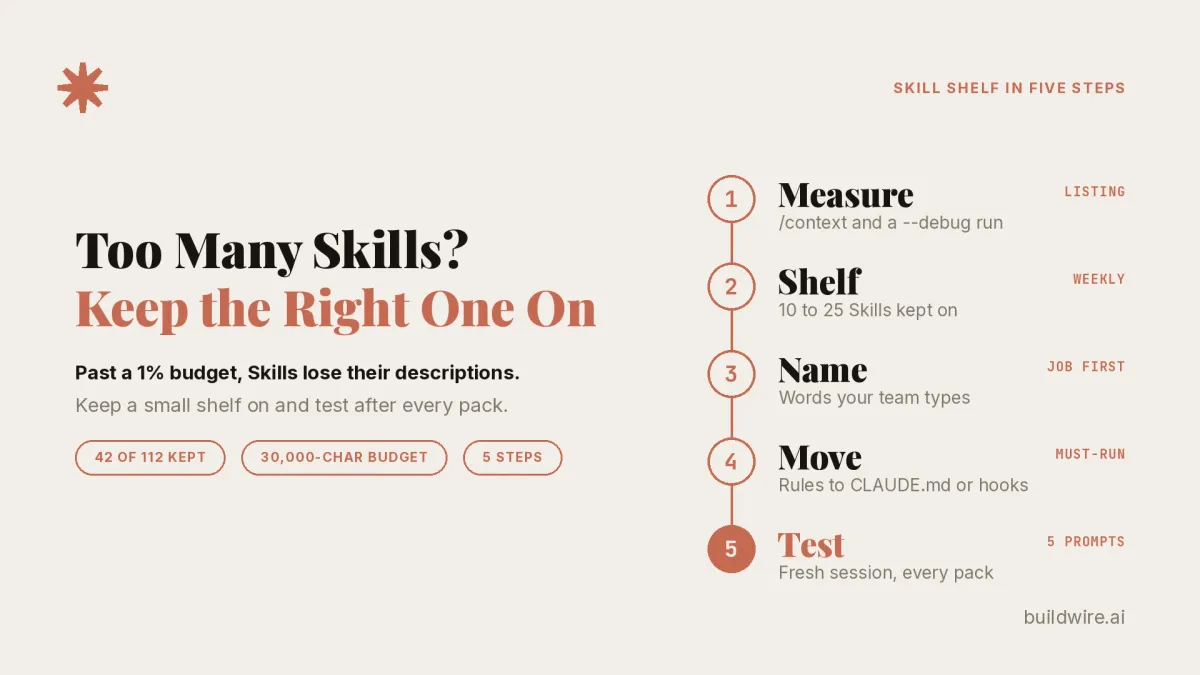
Claude Code sends every Skill name, but drops descriptions from the least-used Skills once the listing passes 1% of the context window. With all five BuildWire packs, the listing hit 62,504 characters against a 30,000-character budget, and 42 of our 112 Skills kept descriptions. Small shelves and job-style names fix it.
A Claude Skill is a folder with a SKILL.md file that teaches Claude one job, such as a Performance Max audit. Claude loads the full file only when a request matches it (Claude Code Skills docs).
The Skill listing is the short entry per installed Skill that Claude reads before it picks one. Each entry holds the name, the description and the optional when_to_use field (docs on descriptions cut short).
CLAUDE.md is a project file that Claude Code loads into every session as always-on context. It suits rules that should apply to every task (Claude Code features overview).
What does Claude see before it picks a Skill?
Claude reads the Skill listing before it uses any Skill. It opens the full SKILL.md file only after it decides a Skill fits the request (Verified, Claude Code Skills docs, read 19 Oct 2026).
The listing has a size budget that scales at 1% of the model's context window (Claude Code docs). The context window is the total amount of text the model can hold in one session. Every Skill name always stays in the listing. When the listing grows past the budget, Claude Code drops descriptions to fit. The least-invoked Skills lose theirs first.
Each entry also has its own cap. A Skill's description plus its when_to_use text has a 1,536-character limit, set by skillListingMaxDescChars. Every character under that cap still counts against the shared budget.
Those fields live in the frontmatter, the block of settings between two --- lines at the top of SKILL.md. If that YAML breaks, the Skill arrives with empty metadata. Claude then has no description to match against.
What happened when we installed all five BuildWire packs?
The five public BuildWire packs hold 118 Skill files and 111 distinct Skills, since some Skills appear in two packs. Descriptions run from 116 characters (Performance Max Auditor) to 1,019 (Link Building Strategist), with a median of 478. Of those, 24 Skills sit under 300 characters, and none come near the 1,536 cap.
On 19 Oct 2026 we created one fresh scratch project on Claude Code 2.1.302 with Opus 5.5 and a 1M window. We installed all five packs as 112 project Skill folders and ran the session with --debug. The log warned that the listing was over budget, at 125 Skills and 62,504 characters against a 30,000 budget. It also said Claude Code would truncate descriptions.
The listing Claude Code sent came to 29,996 characters. It had 125 entries, 54 with descriptions and 71 with the name only. Of our 112 Skills, 42 kept their descriptions, and the other 12 descriptions belonged to built-in Claude Code Skills. The first request in that session used 13,687 tokens.
In a fresh project with no usage history, the cut fell in alphabetical order. Everything from "dataforseo" onward lost its description. That list included GSC Data Interpreter, Technical SEO Auditor, Search Terms Analyzer, Negative Keyword Miner, Performance Max Auditor and GEO. Usage history on a machine can reorder the list, so your cut line will differ from ours.
How much room does each pack take?
We counted name plus description characters per pack to estimate listing size (Inferred). On a 1M-window Opus setup, the budget is 30,000 characters. Built-in entries used 6,629 characters in rulestack's install. That leaves about 23,400 for your own Skills (Inferred).
| Pack | Skill files | Estimated listing size (Inferred) |
|---|---|---|
| SEO | 26 | about 14,400 characters |
| Founder, Product and Research | 27 | about 13,700 characters |
| Paid Advertising | 28 | about 11,900 characters |
| Analytics and Conversion | 19 | about 10,000 characters |
| Creative and Brand | 18 | about 9,700 characters |
| All five | 118 files, 111 distinct Skills | about 56,100 characters |
Any single pack fits. Most setups overflow once two packs share the listing.
| Pack pair | Estimated size (Inferred) | Fits in about 23,400? |
|---|---|---|
| SEO plus Founder | about 28,100 | No |
| SEO plus Paid | about 26,300 | No |
| Founder plus Paid | about 25,200 | No |
| SEO plus Analytics | about 24,300 | No |
| SEO plus Creative | about 24,100 | No |
| Founder plus Analytics | about 23,700 | No (slightly over) |
| Founder plus Creative | about 23,400 | No (over by a few dozen characters) |
| Creative plus Paid | about 21,600 | Yes |
| Analytics plus Paid | about 19,300 | Yes |
| Analytics plus Creative | about 19,100 | Yes |
These are estimates from character counts, with Skills that sit in both packs counted once. Your built-in entries, other installed Skills and context window size all move the line.
Do name-only Skills still fire?
With the listing cut, we ran three trigger prompts on Opus 5.5, each in a fresh session. Three prompts is a small sample, and we treat it as a spot check rather than a benchmark (Verified).
| What the prompt asked | Skill that fired | Description sent? |
|---|---|---|
| Find wasted Google Ads search terms to add as negatives | Negative Keyword Miner | No, name only |
| Pages dropping out of Google's index and broken redirects | Technical SEO Auditor | No, name only |
| Getting cited in Google AI Overviews, ChatGPT web search and Perplexity | GEO | No, name only |
All three picks made sense. Two of them show a catch.
In the first test, Search Terms Analyzer was also name only. Its description covers the same job: wasted spend, negative keyword opportunities, new keywords and match types. Claude did not choose it. The prompt said "negatives," and Negative Keyword Miner carried that word in its name.
In the third test, the AEO Skill kept its description, and GEO did not. Claude still picked GEO. The AEO description talks about featured snippets, voice search and People Also Ask. That matches a different question from the one we asked.
The rulestack lab on DEV tested name-only targets with opaque code names, tq-023 to tq-160, and shuffled trigger phrases (Reported). The model invoked those targets 0 of 3 times, while targets with descriptions went 7 of 7. Our name-only Skills had job names, and they fired 3 of 3.
Both results fit one read (Inferred). A name carries the trigger only when the name says the job. The description is what separates two Skills with overlapping jobs. Vague, brand-style or code names are the ones at risk. We did not test Sonnet or Haiku.
Why are Skills going quiet now?
- The Claude Code docs now include a section on Skill descriptions being cut short (Verified, read 19 Oct 2026).
- On 9 Oct 2026, rulestack published a lab on Claude Code 2.1.289 with Opus 5.5 and a 1M window (DEV post, Reported). There, 160 installed Skills kept 20 descriptions. With 40 Skills, 22 kept descriptions, and with 80, 21 did.
- On 18 Oct 2026, @Asteri_eth shared Anthropic's feature map for Claude Code (Reported). The map assigns always-on rules to CLAUDE.md and things that must happen every time to hooks. Skills hold on-demand playbooks, where "only the description sits in context until it's used".
- On 17 Oct 2026, @themuscleai counted five Skill repos trending on GitHub in one day (Reported). More repos means more installs per project.
- On 2 Oct 2026, @Mudit_writes posted a fix for Skills that do not trigger, built on /skill-doctor and /skills (Reported). The post opened with "Claude Code skill not triggering? The skill might be fine."
- On 22 Sep 2026, @ClaudeCodeLog reported that Claude Code made Opus 5.5 the default with a 1M context window (Reported). The budget is 1% of the window, so anyone on a 200K window has far less room. In rulestack's run with
CLAUDE_CODE_DISABLE_1M_CONTEXT=1, 0 of 160 project descriptions survived.
We analyzed 13 Claude Skills search terms with DataForSEO on 19 Oct 2026, for US Google. "claude skills" gets 40,500 monthly searches (keyword difficulty 27). "claude code skills" gets 12,100 (difficulty 30), and "claude skills best practices" gets 260. "claude skills not working" and "claude code skills not working" get 10 each. 6 of the 13 terms, including "claude skills not triggering", returned no volume data. In the Google results for "claude code skills" that day, the AI Overview cited the Claude Code docs, Anthropic Academy and one developer blog. It described the frontmatter as "approx. 100 tokens" per Skill. None of the eight organic result titles dealt with Skills that stop firing or with the listing budget. Our read (Inferred) is that people search for Skills in volume, but almost nobody searches the failure by name yet. So they hit the problem before they know what to call it.
How do you keep the right Claude Code Skills firing in five steps?
A shelf is the small set of Skills you keep fully on for the work in front of you. Everything else stays installed but quieter.
The five steps at a glance:
- Measure the listing with
/contextand a--debugrun. - Keep a small weekly shelf on and set the rest to name-only or off.
- Name and describe each Skill with the words your team types.
- Move must-run rules into CLAUDE.md or hooks.
- Test triggers in fresh sessions after every new pack.
1. Measure the listing
Run /context and look at the Skills row, which reports the listing size after the budget. Start a session with --debug and search the log for the "Skill listing over budget" warning. On version 2.1.252 and later, /skill-doctor checks Skills directly. /doctor covers the wider install and estimates the listing's context cost.
You can also ask Claude "What skills are available?" and compare the answer with what you installed. If a Skill you rely on appears as a bare name, it sits past the cut line.
2. Keep a small weekly shelf on
Pick one pack, or the 10 to 25 Skills your team uses this week. Open /skills and highlight each Skill. Press Space to cycle it through on, name-only, user-invocable-only and off, then press Esc to save to .claude/settings.local.json. The same states can be set with skillOverrides in settings.
For a Skill you only ever call by hand, add this to its frontmatter so it stays out of automatic matching:
disable-model-invocation: true
You can still run it with /name. Plugin Skills ignore skillOverrides, so manage those through /plugin.
You can also raise the budget with skillListingBudgetFraction or the SLASH_COMMAND_TOOL_CHAR_BUDGET environment variable:
{
  "skillListingBudgetFraction": 0.02
}
This has a cost. In rulestack's run, 0.02 kept 50 of 160 descriptions and added 8,282 tokens to the first request (Reported). If token spend is the worry, our guide to routing simple subagent jobs to Haiku 5.5 covers the other side of the bill. You pay the higher budget in every session, so a smaller shelf is usually the cheaper fix.
3. Name and describe each Skill like the job
The name is the one field that always survives. Put the words your team types into it, such as "negatives," "search console" or "redirects." In our first test, the Skill whose name held the prompt's word won. Its neighbor describes the same job in more detail and lost. We read the name match as the reason (Inferred).
Rename vague or brand-style Skills first. A name like "Atlas" or "Growth Helper" gives Claude nothing to match once the description is gone. The rulestack post gave the same advice to put trigger words in the name (Reported).
Then rewrite the description. Lead with what the Skill does, then add a "Use when" line with phrases from your team's real requests. Our GSC Data Interpreter follows this pattern. It opens with the job, then says "Use whenever someone shares a Google Search Console export and wants it analyzed." It also lists phrases like 'analyze this Search Console export' and 'why are these keywords declining'.
Performance Max Auditor is our weakest example. Its full description is 116 characters.
Before (shipped file): "Comprehensive Performance Max campaign audit identifying wastage, missed opportunities, and ROI optimization actions". It names the job but has no "Use when" line and no phrase a marketer would type.
After (our suggested rewrite, not a shipped file): "Audits Google Ads Performance Max campaigns for wasted spend, missed opportunities and return on ad spend fixes. Use when someone shares a Performance Max export or asks 'audit my PMax campaign', 'where is PMax wasting budget' or 'why did PMax ROAS drop'."
The rewrite stays well under the 1,536 cap. It gives Claude real phrases to match when the description survives the cut.
4. Move must-run rules out of Skills
The docs say always-on rules belong in CLAUDE.md, and rules that must hold every time belong in hooks (Verified). An instruction in CLAUDE.md or a Skill is "a request, not a guarantee," and hooks enforce it. A Skill runs only when Claude picks it, and a cut description makes that less likely. Brand voice rules, banned claims and approval checks should not depend on a match.
A rule placed only in a Skill description fired about 60 to 67% of the time, against 100% as a CLAUDE.md rule (Reported, second-hand). The test came from the planning-with-files project, as @sitin_dev reported.
5. Test triggers in a fresh session, then re-check after every new pack
Write 5 real prompts for each Skill on your shelf. Run each one in a fresh session with the Skill on, then again with it off. Note which Skill fired. If the wrong neighbor wins, fix the name or the "Use when" line.
The skill-creator plugin automates this. Install it with /plugin install skill-creator@claude-plugins-official. It generates should-trigger and should-not-trigger prompts and measures the hit rate.
Claude Code stores usage history per machine (skillUsage in ~/.claude.json), so a teammate's laptop may cut the list differently. Re-run the tests after every new pack.
Where does this apply outside Claude Code?
Everything above is documented for Claude Code. We did not measure claude.ai chat. Skills enabled on claude.ai sync into Claude Code terminal sessions on 2.1.273 and later, so they add to the same listing. Cowork and cloud sessions, including routines, do not read ~/.claude/skills.
Our BuildWire Skills library ships packs as .skill files for claude.ai upload. For Claude Code, unzip them into ~/.claude/skills or .claude/skills, as covered in our Claude Code installation and setup guide. Afterwards, run claude plugin validate .claude/skills (2.1.233 and later) to catch malformed frontmatter.
Before adding any pack, run it through our pre-install intake test for Skills. If you are unsure whether a job belongs in a Skill, our guide on Skills vs MCP connectors vs plugins helps pick the layer.
BuildWire builds AI agents and automations for marketing and growth teams. Read more about us, or see what we build on the services page.
If you want help picking the Skills for your team's weekly shelf and testing that they still fire, book a call.
Want the Claude Code workflows we run every week, written up like this one? Subscribe to The AI Driven Marketer newsletter, and follow along as we turn slow marketing jobs into short ones.
Frequently asked questions
Why is my Claude Skill not triggering?
A common cause is a Skill listing past its budget, so the Skill reaches Claude as a name with no description. If the name does not match your wording, Claude picks a neighbor or no Skill. Check the Skills row in /context or run a session with --debug. Then rename the Skill, sharpen its description or shrink your shelf.
What are Claude Code Skills?
Claude Code Skills are folders with a SKILL.md file that teach Claude a specific job, such as auditing a Google Ads account. Claude sees each Skill's name and description up front and loads the full instructions only when a request matches. You can also run a Skill by hand with a slash command and its name.
How many Skills can Claude Code handle?
There is no fixed count, because the budget is measured in characters. On a 1M-window Opus setup the budget is 30,000 characters, and in our lab 54 of 125 entries kept descriptions. By our estimate, any one BuildWire pack fits, and most pairs do not.
Should I raise skillListingBudgetFraction?
Only if a smaller shelf will not cover your work. In rulestack's run, a setting of 0.02 kept 50 of 160 descriptions and added 8,282 tokens to the first request. You pay that cost in every session.
Does this affect claude.ai?
The budget behavior is documented for Claude Code, and we did not measure claude.ai chat. Skills you enable on claude.ai do sync into Claude Code terminal sessions on 2.1.273 and later, where they count toward the listing.
Which BuildWire pack should I start with?
Start with the pack that matches this week's work. Use the SEO Skills pack for search work and the Paid Advertising Skills pack for ad audits. Any one pack fits on its own by our estimate.
Last reviewed 20 October 2026.
How we checked this guide
We read the Claude Code Skills docs and the features overview on 19 Oct 2026 for how the listing, budget, settings and checks work. The rulestack numbers come from their DEV post of 9 Oct 2026 and carry the Reported label. We re-read the X posts through a public mirror on 19 Oct 2026. Search volumes and the Google results come from a DataForSEO keyword_overview and SERP pull for the US on 19 Oct 2026.
Pack sizes and description lengths are our count of the five public BuildWire packs, downloaded 19 Oct 2026. Per-pack listing sizes and pair fits are our arithmetic from those counts.
The lab was one fresh scratch project on Claude Code 2.1.302 with Opus 5.5 and a 1M window, run on 19 Oct 2026. We took the counts from the --debug log and from the listing Claude Code sent.
We did not test Sonnet or Haiku, claude.ai chat or repeat runs of the 3 trigger prompts. We did not test skillListingMaxDescChars or the skill-creator plugin. We also did not test how usage history reorders the cut on a machine with history. The 3 prompts are a small sample and a spot check, not a benchmark.
Editorial review: Rananjay Raj reviewed this guide before it went live. To report an error, use our contact page.
