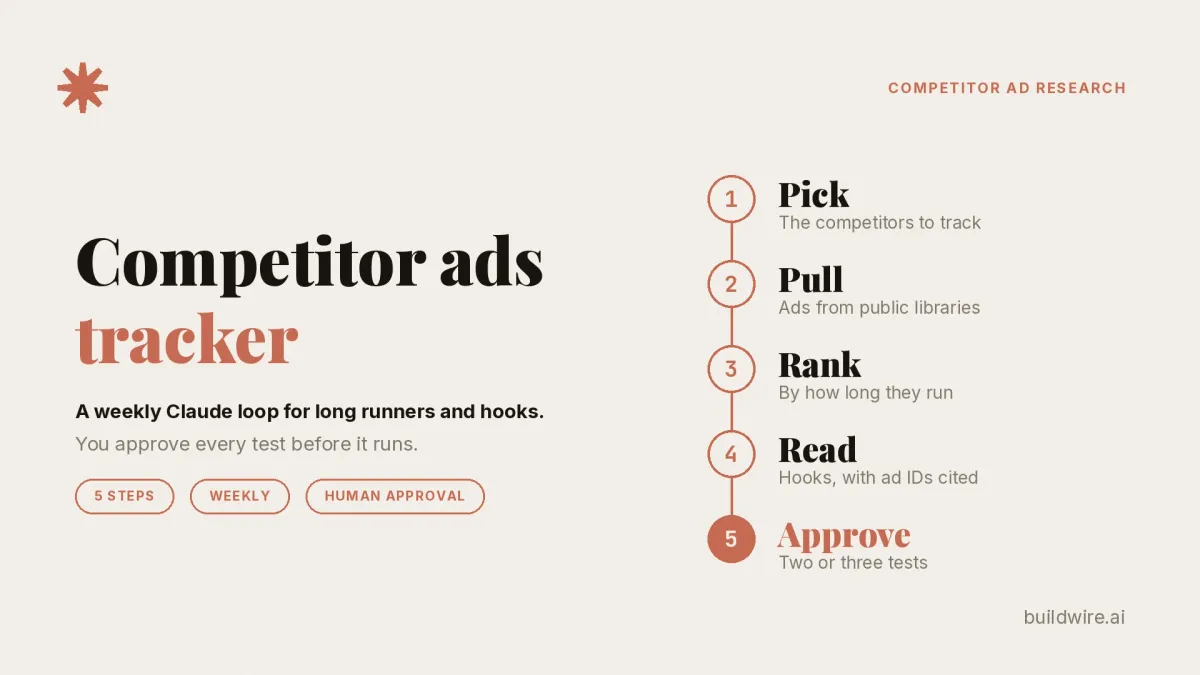
A competitor ads tracker is a weekly loop, not a spy tool. Pull your rivals' ads from the public ad libraries. Rank them by how long each one has run. Have Claude break down the hook, angle and offer with the ad ID behind every point. Then a person picks the two or three ideas worth testing.
Copying ads is not the system. The approval step is.
This guide replaces our older n8n setup doc. Automation is now optional. A human decision ends every run.
What is a competitor ads tracker?
A competitor ads tracker is a repeatable process that collects the ads a fixed set of competitors run and reviews them on a schedule. The output is a short list of test ideas, not a folder of screenshots.
It runs on four moves, every week:
- Pull ads from the public libraries.
- Rank them by run length.
- Break them down with Claude.
- Approve what you test.
Before the first run, you do one setup job: pick the competitors and record their IDs. That is Step 1 below. Steps 2 to 5 are the weekly loop.
What can you pull from each ad library?
Each platform shows different data. Know the limits before you build anything.
The Meta Ad Library is Meta's public database of ads. Meta's About the Meta Ad Library page says: "The Ad Library contains all active ads that are shown across Meta technologies."
The Google Ads Transparency Center is Google's searchable record of ads from verified advertisers. Google's launch post says you can see the ads an advertiser has run, the region, the format and the last date an ad ran.
| Library | What you can see | Limit to plan around |
|---|---|---|
| Meta Ad Library | All ads currently running on Meta apps | The API returns far less than the web library (see below) |
| Google Ads Transparency Center | Ads, regions, formats, last date shown | Ads from verified advertisers only |
| LinkedIn Ad Library | Preview, format, advertiser, payer | Run dates and impressions only for ads targeted to the EU |
| TikTok Ad Library | First shown, last shown, unique users, targeting | Only ads shown in the EEA, Switzerland and the UK |
| TikTok Creative Center Top Ads | A browsable gallery of auction ads | Category inspiration, not a per-competitor record |
LinkedIn's Ad Library help page says ads remain for one year after their last impression.
What does the Meta Ad Library API actually return?
Less than the web library shows. We read Meta's own reference pages for this.
- The ads_archive endpoint requires a country. Meta's note says ads that did not reach any location in the EU "will only return if they are about social issues, elections or politics."
- You can search by up to 10 Page IDs at once with
search_page_ids. - The archived ad fields include
ad_delivery_start_time,ad_delivery_stop_time, the ad text and a snapshot URL. - Spend and impressions ranges are available only for political and issue ads. Reach fields such as
eu_total_reachare available only for ads delivered to the EU.
So the API suits competitors who advertise in the EU. For a US-only or India-only commercial brand, use the web library or a scraper.
Meta's archived ad reference allows a download of creative for an individual ad, not a batch. If you download it, it must be for analysis, and you must follow the data storage terms in Meta's Terms of Service. Keep the archive internal.
Step 1: Which competitors should you track?
Pick three to five. More than five and nobody reads the digest.
Choose them by overlap, not by size:
- They bid on your terms or sell to your buyer.
- They run ads on the platforms you run ads on.
- At least one is a newer brand you keep running into.
Record each one in a single sheet. One row per competitor:
| Column | Example |
|---|---|
| Competitor | Example Co |
| Facebook Page ID | The numeric ID from the Page's Ad Library URL |
| Google advertiser name | As shown in the Transparency Center |
| Domain | exampleco.com |
| LinkedIn company name | Example Co |
| Markets | US, IN |
Page IDs matter. Names change and pages get renamed. The ID stays the same, and both the Meta API and most scrapers accept it.
Step 2: How do you feed competitor ads into Claude?
This is where most people get stuck. There are three routes. Start with the cheapest one that covers your markets.
| Route | How it works | Best for | Watch out for |
|---|---|---|---|
| Manual export | Open each library, copy the ad text, ID and dates into the sheet, save screenshots | Three competitors, one platform | Takes discipline every week |
| Scraper | An Apify Facebook Ads Library actor takes a Page URL or Ad Library URL and returns JSON | Five competitors, Meta heavy | Usage costs, and you own the compliance call |
| Browser or MCP tool | Claude reads the library through a connected browser tool or an MCP server | Ad hoc deep dives | Slower, and pages change |
A few practical rules for each route:
Manual. Paste text as well as screenshots. Text keeps the ad ID and dates exact. Use one row per ad: ad ID, competitor, platform, first seen date, ad text, headline, CTA and landing page URL.
Scraper. The Apify actor's sample output includes startDate, endDate, isActive, pageName and the ad body. That is enough to rank by run length. Apify's page notes that some public data can still count as personal data under GDPR. Pull only ad copy, dates, CTA and landing page.
Browser or MCP. Good for "show me everything Example Co ran this month." Weak as a weekly record. Save the output into the same sheet.
Whichever route you use, the output is the same: a CSV or sheet with one row per ad. Claude gets that file, not a loose pile of links.
Step 3: Why rank competitor ads by run length?
An ad that keeps running usually earns its place. Advertisers tend to stop ads that lose money. So run length is the best free signal the libraries give you.
But it is a signal, not proof. Ads run long for at least three other reasons:
- Big budgets. A large brand can leave a weak ad on longer than you would.
- Testing. A long-running ad might be one control in a test you cannot see.
- Evergreen jobs. Brand, hiring and retargeting ads often run for months by design.
So rank, then read. Our starting defaults:
- Long runner: active 30 days or more.
- Proven runner: active 60 days or more, or relaunched with the same hook.
- New this week: first seen in the last seven days.
Work out days running from the start date in your data. For TikTok, use "First shown." For Google, the Transparency Center shows the last date an ad ran. If a library shows no start date, record the first week you saw the ad.
Look for clusters, too. Five versions of one hook running at once tells you more than one long runner.
Step 4: What prompt makes Claude's ad breakdown specific?
Generic output comes from loose input and loose rules. Fix both. Give Claude the sheet, then this prompt.
You are reviewing competitor ads for a weekly test plan.

INPUT: The attached sheet. One row per ad, with ad_id, competitor,
platform, start_date, days_running, ad_text, headline, cta,
landing_page_url.

TASK: For each ad marked "long runner" or "new this week", fill this table:
ad_id | competitor | days_running | hook (first line, quoted exactly) |
angle | pain point | offer | format | CTA | landing page promise

RULES:
1. Quote the hook word for word from ad_text. Do not paraphrase it.
2. Every claim must cite the ad_id it came from.
3. If a field is not visible in the data, write "not in data". Do not guess.
4. Do not describe an ad as a winner. Say "long runner" or "new".
5. No general marketing advice. Every line must point to a specific ad.

THEN: Group the ads into patterns. A pattern needs at least two ad_ids
from the sheet. For each pattern, give:
- the pattern in one sentence
- the ad_ids that show it
- one test idea for OUR brand that uses the angle, not the wording

Finish with: "What changed since last week", based only on the
new-this-week rows.
The rules do the work. Quoting the hook stops Claude from inventing a better one. The ad ID makes every line checkable. "Not in data" stops Claude from filling gaps with guesses.
If you prefer a packaged version, our free Competitor Ads Extractor skill tags ad library records by message, offer and format. The Meta Ads Creative Analyzer reviews hooks and format fit. You don't need either one for this workflow.
Step 5: Who approves what you test?
A person does, every week. Skip this step and the tracker is a folder of ads.
The approval gate has four rules:
- One owner. One named person reviews the digest and makes the call.
- Two or three angles, no more. Pick from the patterns, not from single ads.
- Nothing goes to Ads Manager without a yes. Claude can draft briefs. It does not launch ads.
- Never copy creative or claims word for word. Borrow the angle. Write your own words. Back every claim with your own proof.
Copied ads blur your brand. Copied claims can be false for your product.
If you connect Claude to your ad accounts, keep it read-only by default. Our guide to Meta Ads MCP approval lanes shows how to sort every action into read, draft, approve or never.
What does a weekly competitor ads digest look like?
Here is the shape of one digest. Example data: the competitors, ads and numbers below are made up for illustration.
| Ad ID | Competitor | Days running | Hook (quoted) | Angle | Status | Decision |
|---|---|---|---|---|---|---|
| EX-1042 | Northpeak Skincare | 74 | "Your moisturizer is working against you" | Problem reveal | Proven runner | Test our version |
| EX-1077 | Northpeak Skincare | 41 | "Dermatologist-tested, not influencer-tested" | Proof over hype | Long runner | Test our version |
| EX-2210 | Lumen Labs | 63 | "3 ingredients. That's the whole label." | Simplicity | Proven runner | Hold, needs proof we have |
| EX-2251 | Lumen Labs | 5 | "Black Friday: 2 for 1 until Sunday" | Deadline offer | New this week | Watch only |
| EX-3308 | Field and Fern | 12 | "Made for skin that hates everything" | Identity | New | Skip, off brand |
Decision this week (example): test "problem reveal" and "proof over hype" in our own words. Two angles, one owner, briefs due Friday.
During promo weeks such as Black Friday, offers change fast. A weekly pull catches the shift while it still matters.
How do you schedule the tracker in n8n?
Our older version ran in n8n with Apify and the Anthropic API. The idea still holds, with four updates. You keep a fixed competitor list. Run length is the ranking signal. The prompt follows the rules above. A person makes the final call.
The updated flow:
- Schedule Trigger. n8n's Schedule Trigger docs list
0 12 * * 1as the weekly cron for noon every Monday. - Read the competitor sheet. One row per competitor, with Page IDs and domains.
- Run the scraper. Call the Apify actor with each Page URL. Keep the result count low.
- Code node. Work out days running from
startDateand tag each ad as long runner, proven runner or new. - Claude node. Send the tagged rows with the Step 4 prompt, using a current Claude model.
- Write and notify. Append the table to the sheet and email the digest to the owner. The email goes to a person, not to Ads Manager.
Store API keys in n8n's credential manager, never in a code node. That rule from the old version still stands.
Before you test new angles, check your own account. See our Claude Code audit of Google Ads and our paid and organic search overlap guide.
Want more paid ads workflows written up like this one? Subscribe to The AI Driven Marketer newsletter, and follow along as we turn slow marketing jobs into short ones.
FAQ
How do you see competitor ads on Meta, Google, LinkedIn and TikTok?
Open each platform's public ad library and search by advertiser. You do not need a special account for Meta, LinkedIn or TikTok.
- Meta: Open the Ad Library, pick a country and search the Page name. Meta says anyone can view and search it, and that it contains all active ads shown across Meta technologies.
- Google: Open the Ads Transparency Center and look up a verified advertiser. Google's launch post says you can see the ads they have run, the region, the format and the last date an ad ran.
- LinkedIn: Use LinkedIn's Ad Library. It is a public database you can search by company or advertiser name, payer, keyword, country and date range.
- TikTok: Open the Commercial Content Library. TikTok says you do not need an account, and that the library currently covers ads available to users in the EEA, Switzerland and the UK.
Can the Meta Ad Library API show my competitors' commercial ads?
Only in some cases. Meta's API reference says ads that did not reach the EU return only if they are about social issues, elections or politics. For commercial ads outside the EU, use the web library or a scraper.
Does a long-running ad mean it works?
No. Run length is a signal, not proof. The ad libraries do not define a number of days that means an ad works. Advertisers tend to stop losing ads, so long runners are worth a look. But big budgets, hidden tests and evergreen brand ads also run long. Our starting defaults are 30 days for a long runner and 60 days for a proven runner. Read the ad before you act on it.
Is it legal to use the public ad libraries for competitor research?
The libraries are public transparency tools, and the platforms say anyone can view and search them. This is not legal advice. Meta's archived ad reference covers downloads of an individual ad's creative. If you do so, it must be for analysis. You must also follow the data storage terms in Meta's Terms of Service. LinkedIn's Ad Library help page calls it a publicly available database. TikTok's Commercial Content Library help page says it is available to everyone, with no account required. Do not copy creative or claims word for word. If you use a scraper, you own the compliance call. The Apify actor page notes that some public data can still count as personal data under GDPR.
How often should you run a competitor ads tracker?
Weekly is the cadence this guide uses. The libraries themselves do not set a research schedule. A weekly pull is frequent enough to catch offer changes in promo weeks, and light enough to review in one sitting. If you automate the pull, n8n's Schedule Trigger docs list 0 12 * * 1 as noon every Monday.
What tool can automate competitor ad research with AI?
You can build it from three parts. A public ad library or a scraper collects the ads. A sheet stores them. Claude breaks them down with a strict prompt. Dedicated ad research tools also exist. Whatever you use, keep a person in charge of what gets tested.
How many competitors should a weekly competitor ads tracker cover?
Three to five. That is enough to see patterns and small enough to review in one sitting. Add a competitor only when you drop one.
Ship it this week
- [ ] List three to five competitors and record their Page IDs and domains.
- [ ] Pick one route: manual, scraper or browser tool.
- [ ] Pull this week's ads into one sheet, one row per ad.
- [ ] Tag long runners and new ads with our starting defaults.
- [ ] Run the Step 4 prompt.
- [ ] Name one owner. Approve two or three angles. Write your own copy.
Want a second pair of eyes on your tracker or test plan? Book a call.
How we checked this guide
- We read Meta's About the Meta Ad Library page, plus its ads_archive and archived ad reference pages, on November 18, 2026.
- On the same date, we read the LinkedIn Ad Library help page and TikTok's Commercial Content Library help page. We also read Google's Ads Transparency Center launch post.
- We checked the Apify Facebook Ads Library actor page for its input and sample output, and the n8n Schedule Trigger docs for the weekly cron.
- The run-length thresholds are our starting defaults, not platform rules. The digest table is example data.
- To report an error, use our contact page.